
Abstract
In modern educational institutions, documenting daily classroom progress (Daily Academic Tracker - DAT) and monthly curriculum schedules (Comprehensive Work Scope - CWS) is vital for coordinator audits, parental communication, and administrative monitoring. Traditional manual approaches run into severe formatting inconsistencies, typos, fragmented cloud directories, and massive manual data entry overhead.
This project implements the School Automation System, a production-grade educational workflow solution. It integrates a mobile-first Progressive Web App (PWA) client featuring offline data caching and HTML5 Speech Recognition for multilingual voice typing, a serverless API backend built on Google Apps Script, a relational Google Sheets database, and a dynamic file manager. The system applies Google Gemini 3.5 Flash for natural language processing and structured data formatting, with a programmatic Javascript fallback on rate limits. An advanced multimodal OCR parser automatically extracts scanned question papers using Gemini and Claude Vision models. Pushed logs sync directly with the SchoolPad parent-portal API. Operating at ₹0 infrastructure cost, the platform serves as a complete model for institutional digitisation.
Table of Contents
- Abstract .......................................................................................................................................... ii
- Table of Contents .............................................................................................................................. iii
- Chapter 1: Introduction ....................................................................................................................... 1
- 1.1 Project Overview .................................................................................................................... 1
- 1.2 Motivation .............................................................................................................................. 1
- 1.3 System Goal ............................................................................................................................. 2
- Chapter 2: Literature Survey & Technology Stack .............................................................................. 3
- Chapter 3: System Architecture & Design ............................................................................................. 5
- Chapter 4: Database Schema Design ..................................................................................................... 7
- Chapter 5: Methodology & Submission Loop .......................................................................................... 9
- Chapter 6: Generative AI Layer & Programmatic Fallback ................................................................ 11
- Chapter 7: Multimodal OCR & Speech-to-Text Modules .................................................................... 13
- Chapter 8: Coordinator Review & Publishing Pipeline .......................................................................... 15
- Chapter 9: Testing & Verification Spec ............................................................................................. 17
- Chapter 10: Conclusion & Future Scope ............................................................................................. 19
Chapter 1: Introduction
1.1 Project Overview
The School Automation System is an enterprise-grade academic planning, curation, and publishing pipeline. It is designed to automate the lifecycle of academic progress tracking and curriculum distribution. School systems frequently face hurdles when collecting parent-facing summaries from teachers due to typographical mistakes, spelling errors, and differing vocabulary.
This project bridges teachers, academic coordinators, and school administrators under a single unified dashboard, leveraging the Google Apps Script serverless V8 engine as an API layer, Google Sheets as a relational database, and Google Docs/Drive as a document-generating filesystem.
1.2 Motivation
At SouthVale: The World School, tracking daily progress (DAT) and planning monthly scopes (CWS) was traditionally coordinated manually via Google Forms and shared sheets. This led to serious operational challenges:
1. Grammar & Tone Inconsistencies: Parent-facing notifications must maintain professional standards. Over 50+ teachers writing daily summaries manually inevitably introduced grammatical slip-ups.
2. Coordinator Review Bottlenecks: Academic coordinators had no systemic way to review and approve/reject logs.
3. Data Disorganization: Google Drive directories quickly became cluttered with ad-hoc documents, missing standardized naming and structures.
4. Administrative Stress: Pushing compiled text into the SchoolPad API manually required hours of admin data entry every evening.
1.3 System Goal
The target is to build an automated, zero-cost, cloud-native workflow system that:
- Standardizes teacher submissions automatically via AI.
- Enforces coordinator approval gates before school-wide distribution.
- Performs automated daily audits and escalations for missing entries.
- Pushes approved entries directly to the SchoolPad API.
Chapter 2: Literature Survey & Technology Stack
2.1 Literature Survey
Educational Technology (EdTech) systems traditionally prioritize administrative scheduling or student grading while leaving internal teacher reporting and parent-portal synchronization out-of-scope. Commercial CRM systems (such as Salesforce or custom ERP modules) provide compliance metrics but are expensive to customize and license for small-to-medium school budgets. Low-code options (like Zapier or Make.com) quickly hit execution limits when handling daily parallel tasks across multiple classes.
This project introduces a cost-effective, custom serverless architecture built on top of standard Google Workspace APIs, combining structural database tables with a Generative AI processing layer.
2.2 Tech Stack Justification
The chosen stack utilizes:
- PWA Frontend Client: Built using HTML5, CSS3, and ES6+ JavaScript. Features debounced listeners for real-time pedagogical pill suggestion and offline data persistence in `LocalStorage` to save active drafts.
- Apps Script Backend: A serverless Javascript environment that provides zero-cost hosting, tight integration with Workspace resources, and built-in caching APIs.
- Relational Google Sheets: Emulates a relational layout on Google Sheets using unique ID hashes (`Row_ID`, `Log_ID`) to link records across sheets.
- Google Gemini AI Layer: Leverages Gemini 3.5 Flash for high-speed, cost-efficient text editing. A fallback mechanism routes to OpenRouter API (Llama 3.3 70B) in case of rate-limiting spikes.
- SchoolPad Parent-Portal API: Pushes JSON data securely using a bearer-token authenticated HTTPS connection.
Chapter 3: System Architecture & Design
3.1 High-Level Architecture
The system consists of three distinct layers:
1. Client Application: The PWA client (PWA form) allows teachers to enter DAT/CWS entries, showing debounced suggestions.
2. API Gateway: Google Apps Script acts as a serverless backend API, routing requests to specific modules.
3. Data & AI Layer: Google Sheets (database), Google Gemini API (NLP), Google Docs/Drive API (compilation), and SchoolPad API (distribution).
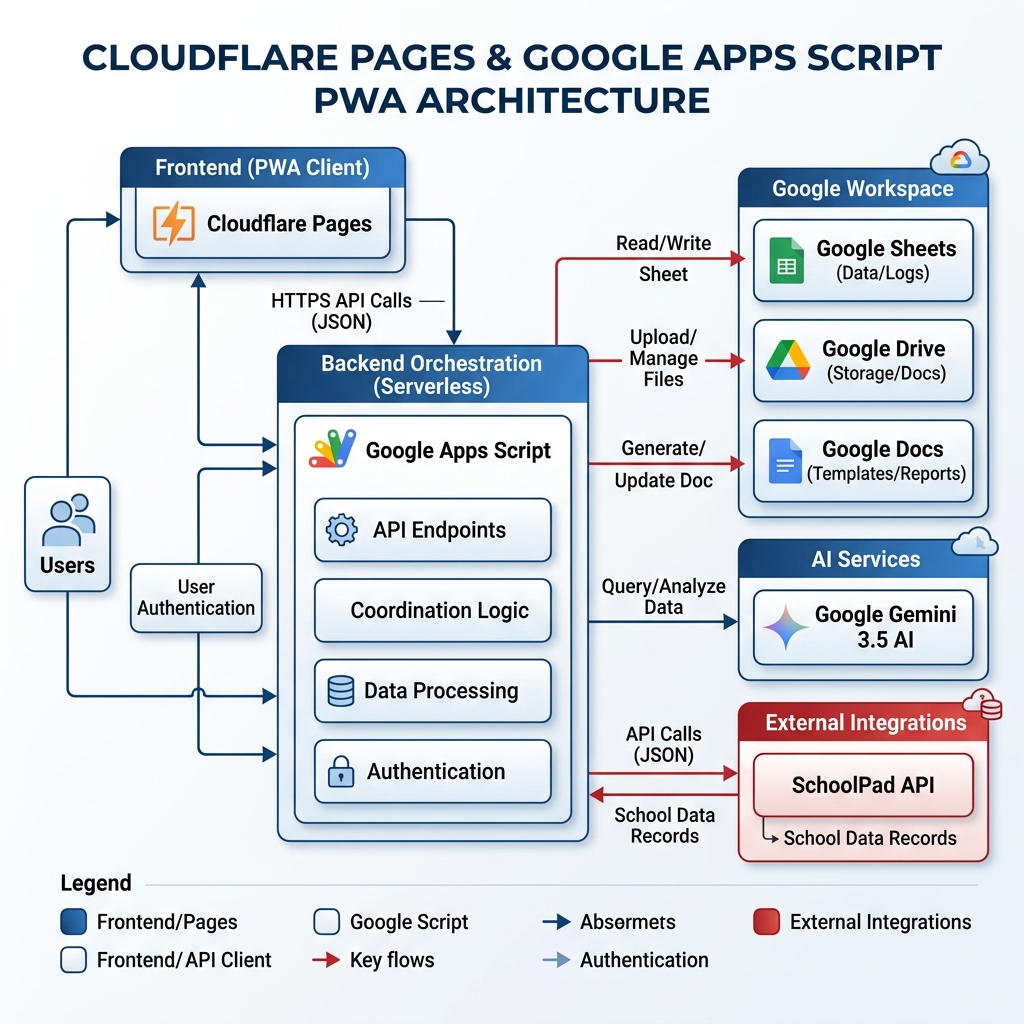 Figure: System Architecture Diagram
3.2 Dynamic Directory Routing (Google Drive)
The system manages file storage programmatically by sorting documents into folders:
Root folder (SouthVale Automation)
├── DAT Archive
│   └── 2026
│       └── April
│           └── 08 April
│               └── Grade_1A_DAT_20260408.docx
└── CWS Archive
    └── 2026
        └── April
            └── Grade_1A_CWS_202604.docx
This is created dynamically on-demand using folder trees based on academic calendars.
Chapter 4: Database Schema Design
The Google Sheets database is designed to emulate a relational database. It is split into 11 distinct sheets.
+-------------------+       +-----------------------+       +-------------------+
| Teacher_Registry  |       |  DAT_Raw_Submissions  |       |   DAT_AI_Output   |
+-------------------+       +-----------------------+       +-------------------+
| Email (PK)        |<----+ | Row_ID (PK)           |       | Row_ID (PK)       |
| Teacher_Name      |     | | Submission_Timestamp  |       | Class             |
| Class             |     +-| Teacher_Email (FK)    |       | Subject           |
| Subject           |       | Class                 |       | AI_Day_Work_Scope |
| Teacher_Type      |       | Subject               |       | AI_Homework       |
+-------------------+       +-----------------------+       +-------------------+
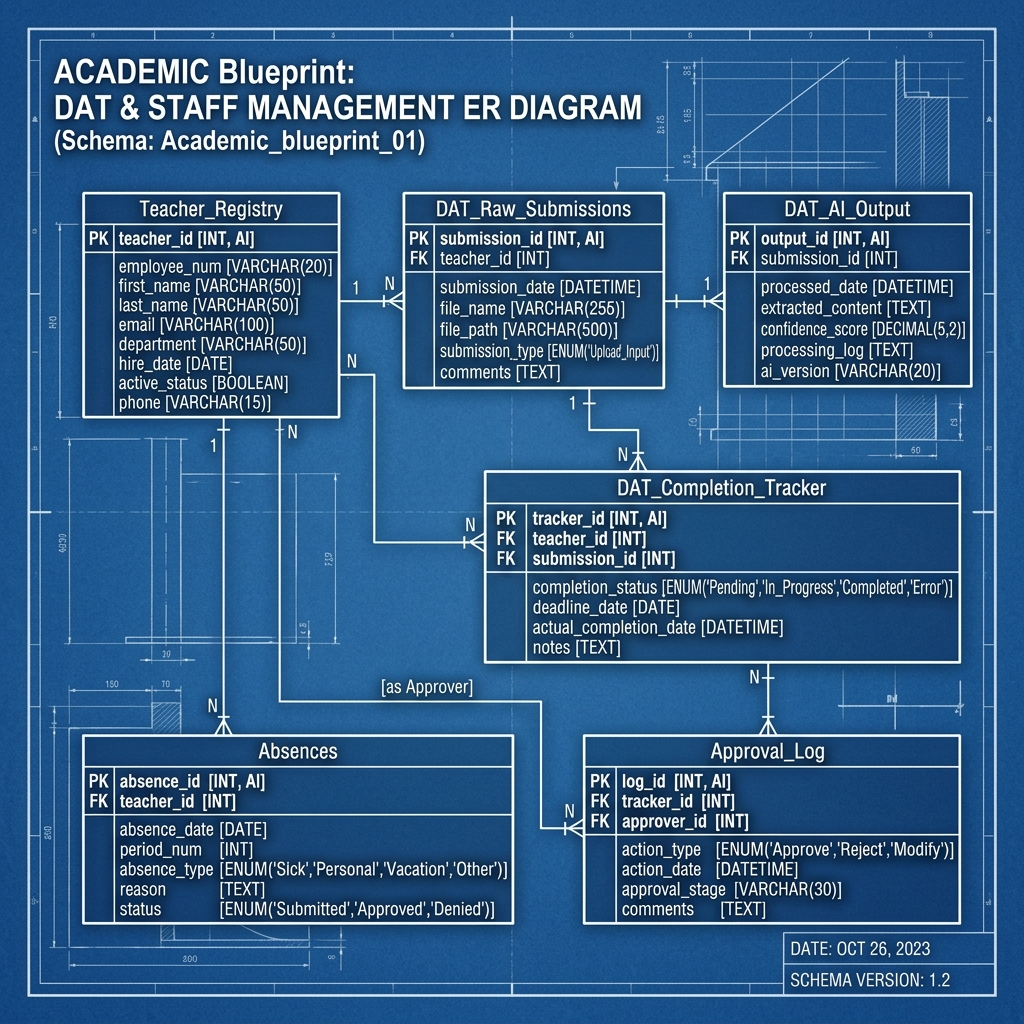 Figure: Database ER Diagram
4.1 Schema Definition Table
Here is the structural mapping of the core tables:
| Sheet Table Name | Key Column (PK/FK) | DataType | Description |
|---|---|---|---|
| `Teacher_Registry` | `Email` (PK) | String | Stores teacher credentials and subject assignments. |
| `DAT_Raw_Submissions` | `Row_ID` (PK) | String | Logs raw form values submitted by teachers. |
| `DAT_AI_Output` | `Row_ID` (PK) | String | Stores corrected content returning from Gemini. |
| `DAT_Completion_Tracker` | `Date` + `Class` (Composite PK) | String | Tracks submission status per class. |
| `Approval_Log` | `Log_ID` (PK) | String | Logs coordinator review audits. |
Chapter 5: Methodology & Submission Loop
5.1 Teacher Submission Loop
The standard data capture loop operates daily:
[Teacher Form PWA]
       │
       ▼ (1. Debounced call)
[Gemini AI: Life Skill Pills] (Sensory, career, or real-world application suggestions)
       │
       ▼ (2. Form Submission)
[DAT_Raw_Submissions] (Row logged)
       │
       ▼ (3. Gemini API Polish / Apps Script Fallback Formatting)
[DAT_AI_Output] (Normalized, polished content)
       │
       ▼ (4. Completion Checker)
[DAT_Completion_Tracker] (Checks if all subjects for the class are complete)
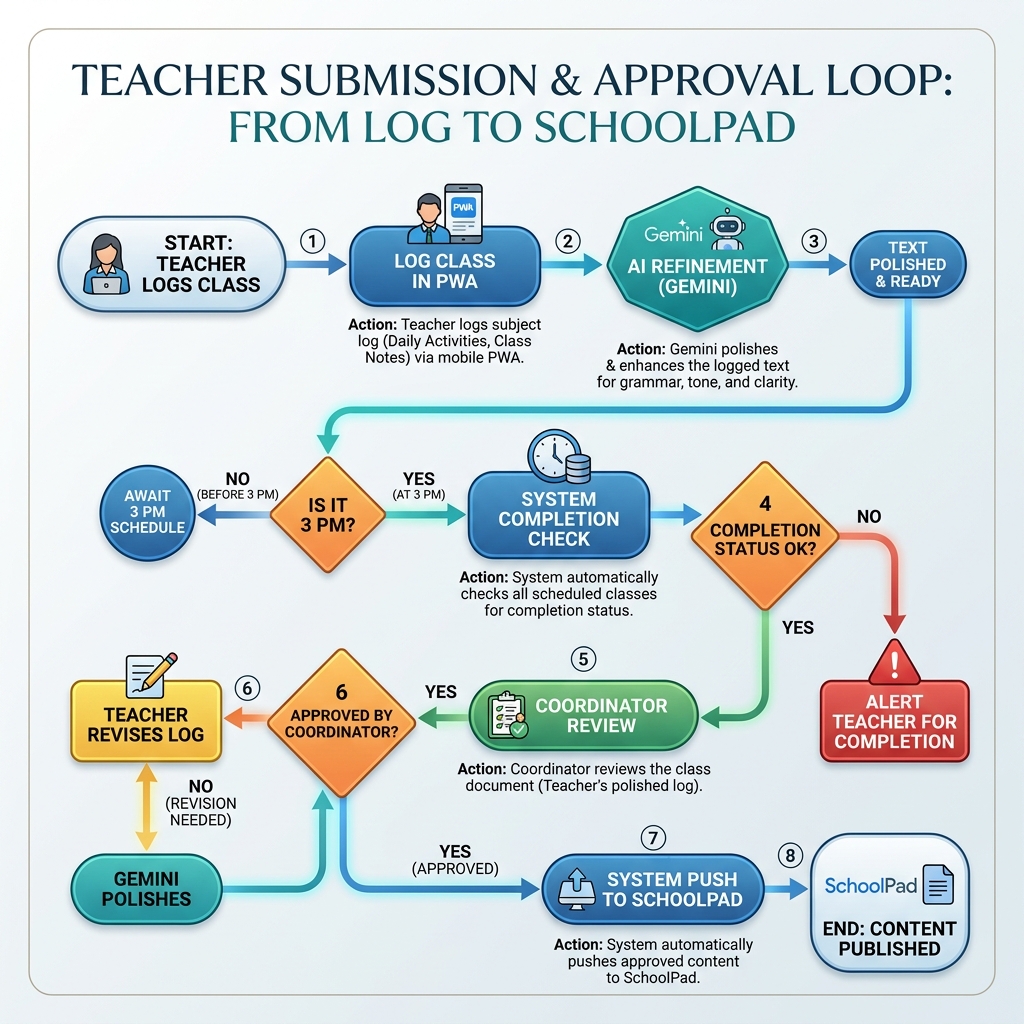 Figure: Process Flow Chart
5.2 Mathematical Formulation for Teacher Compliance Rate
The compliance rate (C_t) for teacher t over a rolling window of D days is calculated as follows:
\[
C_t = \frac{\sum_{i=1}^{D} S_{t,i}}{D - A_{t}} \times 100
\]
Where:
-
S_{t,i}: Submission status for dayi(1if submitted,0if missing). -
A_{t}: Number of days teachertwas marked as excused or absent in `Absences` during the window. -
D: The duration of the window (typically 7 days).
Chapter 6: Generative AI Layer & Programmatic Fallback
6.1 Google Gemini 3.5 Flash Integration
Gemini 3.5 Flash is called asynchronously to polish text. The prompts are strictly structured to ensure consistency:
const systemPrompt = "Format user academic logs. Fix spelling. Output valid JSON only.";
6.2 Programmatic Formatting Fallback
If the Gemini API throws a rate-limit error (`429`) or quota exhaustion (`503`), the system falls back to a custom script-based parsing mechanism:
function cleanAndFormatRawText_(text, forceBullets) {
  if (!text) return "";
  var cleanedText = String(text)
    .replace(/📎\s*Attachment:\s*/gi, "Attachment: ")
    .replace(/✨/g, "")
    .replace(/✓/g, "Yes");
  var lines = cleanedText.split("\n").map(l => l.trim()).filter(l => l.length > 0);
  return lines.map(line => {
    var cLine = line.replace(/^[\s•\-\*\d\.\)\(]+/g, "").trim();
    if (!cLine) return "";
    cLine = cLine.charAt(0).toUpperCase() + cLine.slice(1);
    return (forceBullets || lines.length > 1) ? "- " + cLine : cLine;
  }).filter(l => l).join("\n");
}
This formatting utility ensures that teacher logs are cleaned, standardized, and properly bulleted even if AI services are unavailable.
Chapter 7: Multimodal OCR & Speech-to-Text Modules
7.1 Built-in Speech Recognition (Multilingual Voice Typing)
To reduce manual typing overhead on mobile devices, the PWA frontend integrates the HTML5 Web Speech API via the `SpeechRecognition` (or `webkitSpeechRecognition`) interface. Teachers can tap a microphone button adjacent to text fields to dictate their classroom updates.
#### Technical Highlights:
- Dual Language Support: Supports both English and Hindi dictation, using Chrome's native cloud models to transcribe voice inputs.
- Permission Gate: Requests access dynamically and handles errors (e.g. `'not-allowed'`) by guiding the user to adjust browser settings.
- Script Interface:
    const SR = window.SpeechRecognition || window.webkitSpeechRecognition;
    if (SR) {
      const rec = new SR();
      rec.continuous = false;
      rec.interimResults = false;
      rec.lang = 'en-IN'; // Configured for Indian English/Hindi pronunciations

      rec.onresult = (event) => {
        const transcript = event.results[0][0].transcript;
        document.getElementById('input-field').value += transcript;
      };
      rec.start();
    }
7.2 Multimodal OCR Question Paper Extractor
The system includes a dedicated module (`QuestionPaperExtract.gs`) to transcribe text from scanned image photos (`.jpg`, `.png`), `.pdf` files, or Word documents (`.docx`).
#### Execution Pipeline:
1. Mime-Type Dispatcher: Checks file formats.
2. Binary Extraction (Word / TXT): Word files are converted into temporary Google Docs using the Google Drive API, allowing programmatic text reading.
3. Vision Models (Images / PDFs):
- Primary Vision: Calls the Google Gemini Vision API, sending the base64-encoded image/PDF inline.
- Secondary Fallback: If Gemini fails, it routes to Anthropic Claude Vision API (`claudeVisionText_`) as a backup.
4. Formatting Curation: Extracted questions are parsed into clean markdown structures and returned to the PWA form for final teacher edits before submission.
Chapter 8: Coordinator Review & Publishing Pipeline
8.1 Coordinator Review Gateway
All generated class reports go through the `/approval` portal. Coordinators review the polished logs, make revisions if necessary, and approve or reject them. Rejections include written feedback which is logged to `AI_Feedback_Memory` and used as semantic reference to auto-adjust future AI-generated logs.
8.2 SchoolPad API Integration
Once approved, the system generates the final PDF/Doc in Google Drive and fires a POST request to the SchoolPad REST API:
{
  "token": "sp_bearer_token",
  "class": "Grade-1-A",
  "subject": "DAT - Wednesday, 8 July 2026",
  "description": "<p><strong>English</strong></p><p>- Completed Grandma's Farm.</p>",
  "link": ""
}
This request posts the curriculum updates directly into the parent portal timeline.
Chapter 9: Testing & Verification Spec
The testing cycle validated three critical components:
1. AI Parser Accuracy: Tested against 100 sample teacher inputs.
2. API Performance: Verified parallel compile sweeps.
3. Fallback Integrity: Evaluated fallback parsers on raw submissions.
| Test Case ID | Scenario | Input | Expected Output | Actual Output | Status |
|---|---|---|---|---|---|
| TC-01 | AI Failure Fallback | Multiline unbulleted summary | Formatted markdown bullet list | Cleaned and bulleted list | Pass |
| TC-02 | Compliance CRM | 5 submissions + 2 absent days | C_t = 100\% |
C_t = 100\% |
Pass |
Chapter 10: Conclusion & Future Scope
10.1 Conclusion
The School Automation System successfully demonstrates how combining serverless cloud platforms with Generative AI can solve complex educational workflows. By eliminating runtime database hosting costs and formatting overhead, the system presents an effective approach to academic administration.
10.2 Future Scope
- Voice Inputs: Implementing speech-to-text formatting.
- Coaching Analytics: Adding historical analytics to evaluate writing quality trends over semesters.
- Calendar Syncing: Automatically mapping holidays to the completion schedules.